The Word of God has power. Sermon Studio helps churches carry the preached Word beyond Sunday. A week's worth of content, ready before Monday morning staff meeting.
Under 5 minutes ingest to exportNative macOS application2 Macs included
Captions without the caption grind.
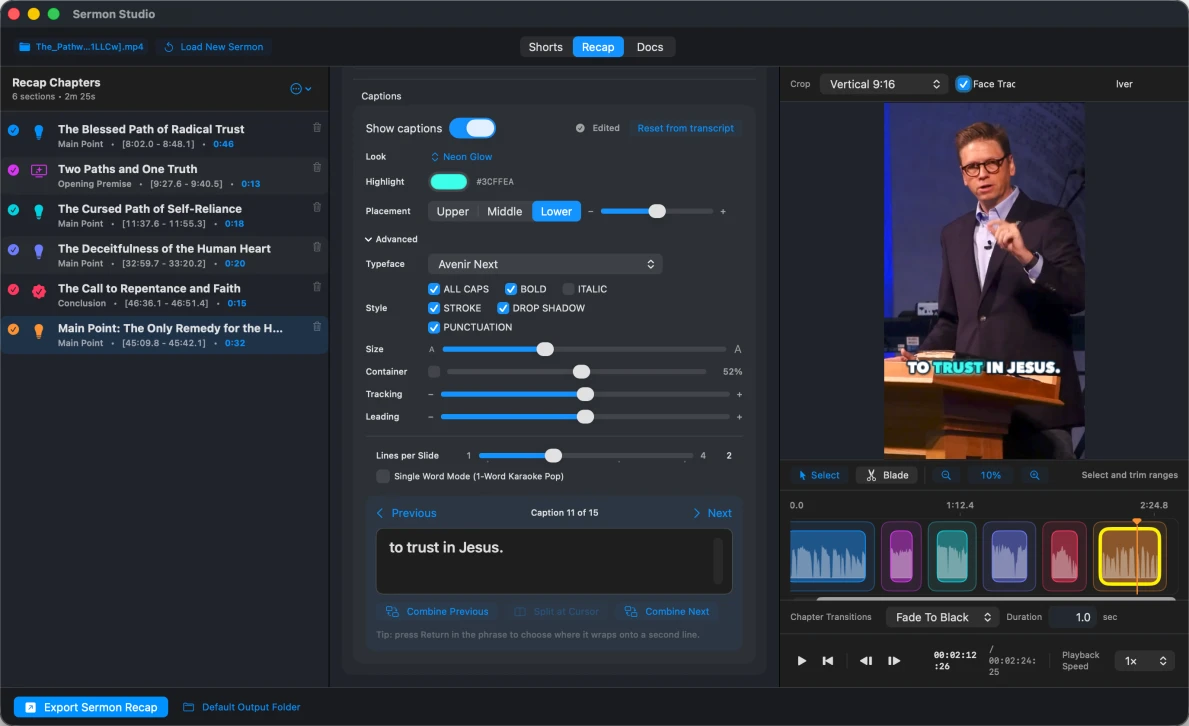
Sermon Studio builds precisely timed captions directly from the sermon transcript. Choose a look, adjust line breaks, placement, type, emphasis, and punctuation, then preview every change immediately. You get polished vertical video without hand-typing captions or rebuilding them in a general-purpose editor.
Save your own custom caption look-and-feel presets.
Your preacher stays in frame.
On-device vision follows the preacher and keeps the speaker framed inside the vertical crop. Sermon Studio turns a wide sanctuary recording into a social-ready 9:16 composition without keyframing every move. Powered by Apple silicon, tracking runs locally while the sermon video stays on your Mac.
Start with the moments worth sharing.
Sermon Studio analyzes the whole sermon and surfaces its strongest, most self-contained moments automatically. Instead of scrubbing through an hour-long recording, you open a ready-to-review set of clips with the original context intact. Fine-tune any cut—or export the whole week in minutes.
01
The Word is the sourceEvery resource begins with Scripture and the sermon.
02
One sermon, many touchpointsClips, recaps, and guides carry it through the week.
03
Your team shapes the resultReview, refine, and approve every piece.
04
Stewardship multipliesOne sermon keeps serving through the week.
THE SPURGEON PRINCIPLE
“
Stand back, and open the door, and let the lion out!
Sermon Studio begins where Sunday's preaching leaves off. It helps ministry teams steward what was preached—removing mechanical friction, preserving the preacher's meaning, and helping God's Word travel farther.
01Faithful to the source.The preached sermon grounds every clip, recap, and ministry resource.
02Built to multiply ministry.One sermon becomes shorts, recaps, guides, and resources for the whole church week.
03Ready while the message is fresh.Move from Sunday's preaching to useful ministry resources before Monday's workday begins.
2 TIMOTHY 2:9
“The word of God is not bound.”
Sermon Studio does not give the Word power. It removes tedious and time-consuming barriers to help it go forth clearly and quickly.
Built around two priorities
A week's worth of content ready in five minutes.
Sermon Studio is a focused workflow designed to move from sermon to finished shorts faster—with less digging, less scrolling, and less time fighting a confusing, bloated app that was designed for Hollywood production, not ministry impact.
01
From ingest to export
Speed.
Sermon Studio quickly surfaces the strongest moments of your preaching, so there is no digging through the whole sermon. And because your sermon stays on your Mac, there is no waiting hours for a massive video file to upload to a third-party website.
UNDER5:00INGESTREVIEWTWEAK (IF YOU WANT)EXPORTDONEFull sermon analysis requires an active internet connection.
02
Only what the job requires
Simplicity.
Final Cut Pro, Premiere Pro, and DaVinci Resolve are exceptional tools for complex productions. Sermon shorts are not complex productions. Sermon Studio strips away the bloat and puts the tools this job needs front and center.
There is no point three. Speed and simplicity. That's it.
Automatically clips,captions, & face tracks while the coffee brews.
The sermon is preached
Now let the Word keep moving.
Five focused steps take you from Sunday's sermon to a week's worth of content—without turning you into a video editor.
01
MP4+
Ingest
Bring in the sermon recording and let Sermon Studio prepare the workspace.
02
3 moments ready
Review
Start with the strongest moments already surfaced from your preaching.
03
CaptionsCropTimingOPTIONAL
Tweak if you want
Adjust captions, framing, or timing—or keep moving with what is already there.
04
9:16✓
Export
Export the finished vertical shorts your church is ready to share.
05
✓Week ready
Done
A week's worth of content, ready before Monday morning staff meeting.
SERMON STUDIO · NATIVE macOSMOPTIMIZED FOR APPLE SILICON
Power without the workstation or server farm
Designed from the ground up for Apple silicon.
Sermon Studio is a native Mac app built to use the performance already inside Apple silicon. You do not need an expensive editing machine or a maxed-out production rig.
01The Mac you already have.Even an entry-level Apple silicon Mac has more than enough power for creating sermon shorts.
02Native speed, focused work.Move smoothly from review to adjustment to export without carrying the overhead of a general-purpose editor.
Schedule & publish
From Sunday’s sermon. To your church’s feed.
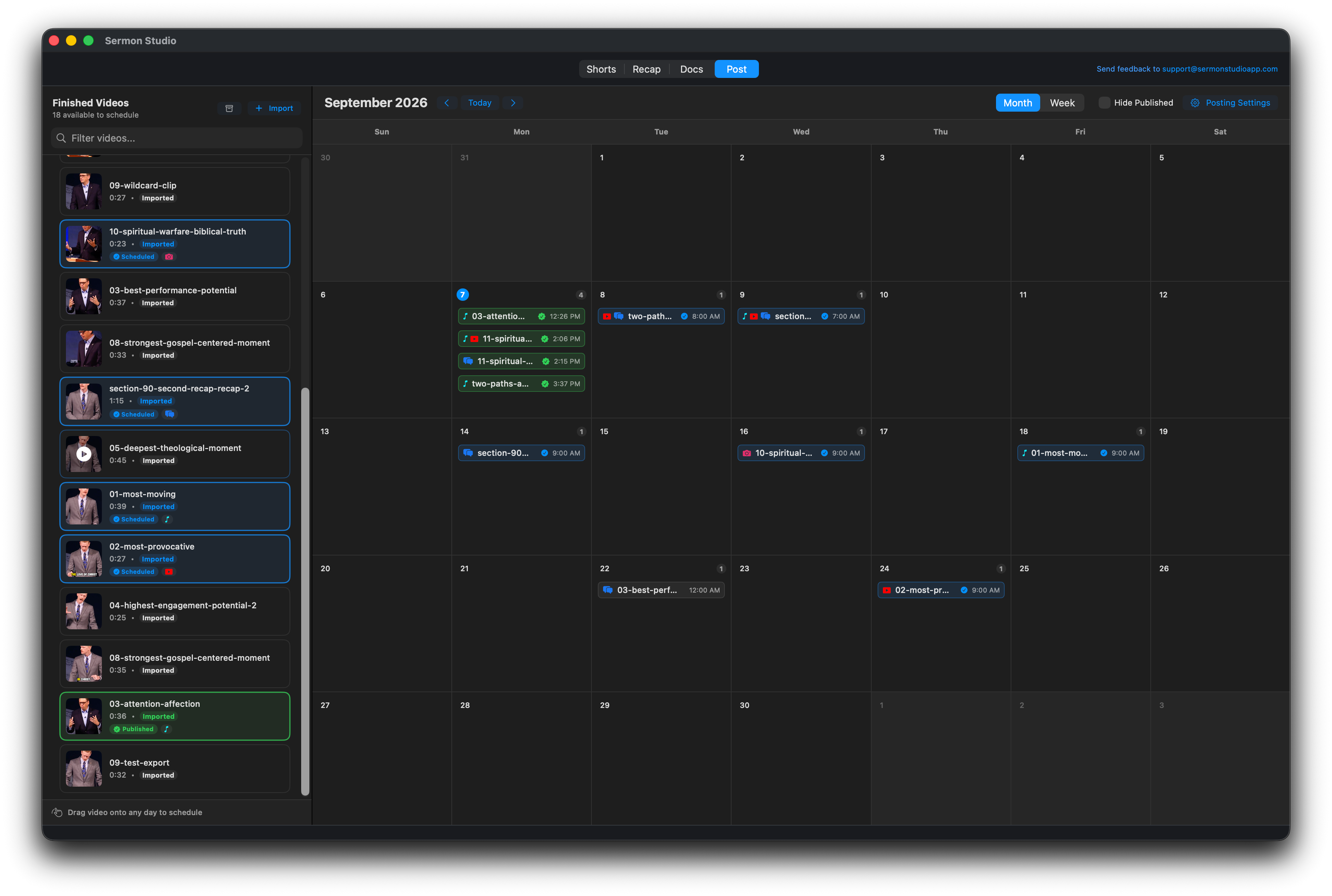
Give every finished video a place in the week. Plan your calendar, choose your channels, and publish from Sermon Studio.
Your finished videos and publishing calendar, together in one workspace.
One video. Your chosen channels.
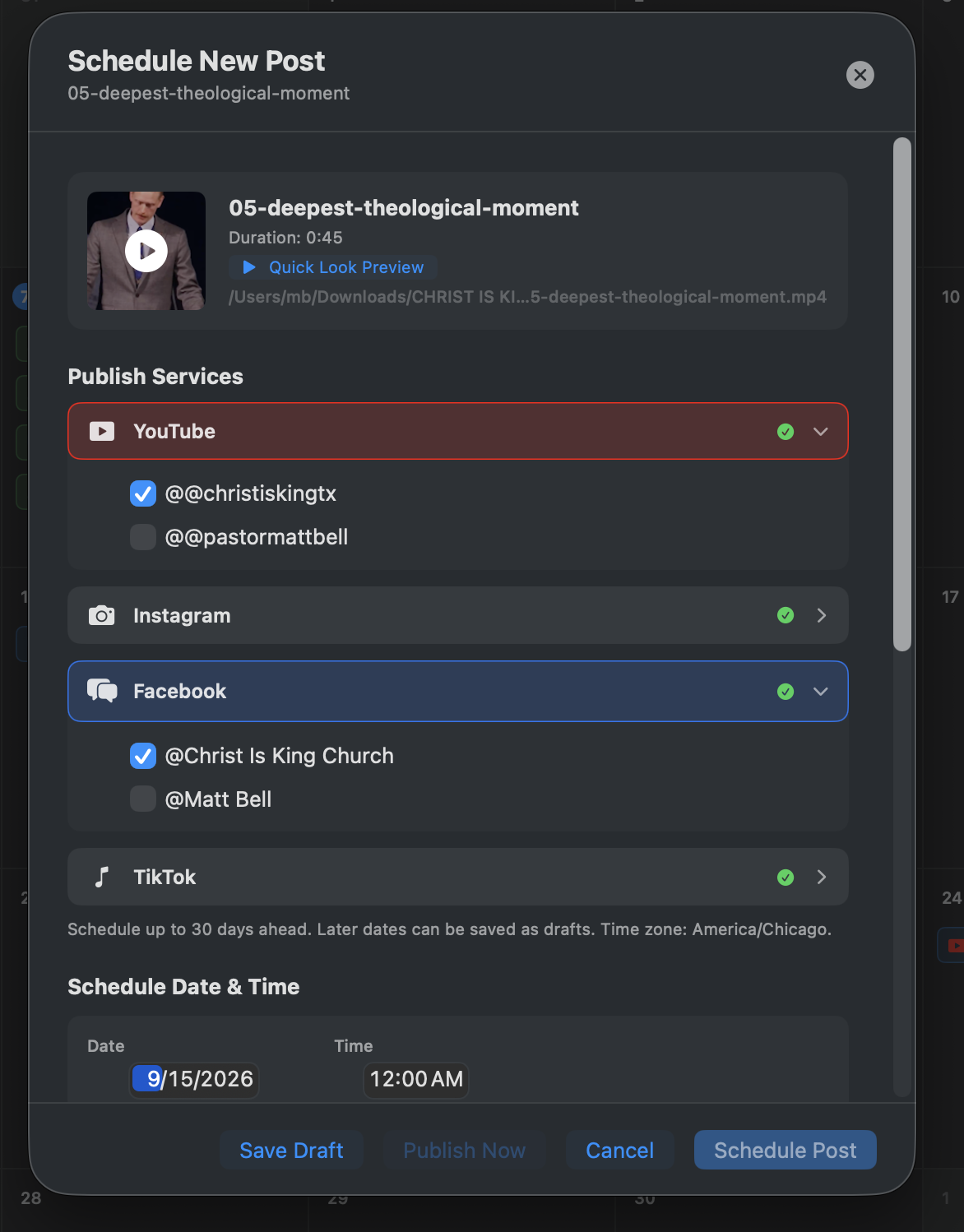
Select the connected accounts you want to reach on YouTube, Instagram, Facebook, and TikTok. Publish now, schedule up to 30 days ahead, or save a draft for later.
Plan the week visually. Drag a finished video onto a day and choose its posting time.
Choose where it goes. Select the accounts and services for each post.
See what’s next. Switch between month and week views and track scheduled and published videos.
Every tool in its proper place
The message stays central. The workflow gets out of the way.
Transcript, Shorts, Recap, Docs, and Post form one connected workflow for stewarding a preached message.
Let strong moments travel
Surface the moment. Keep the preacher’s meaning.
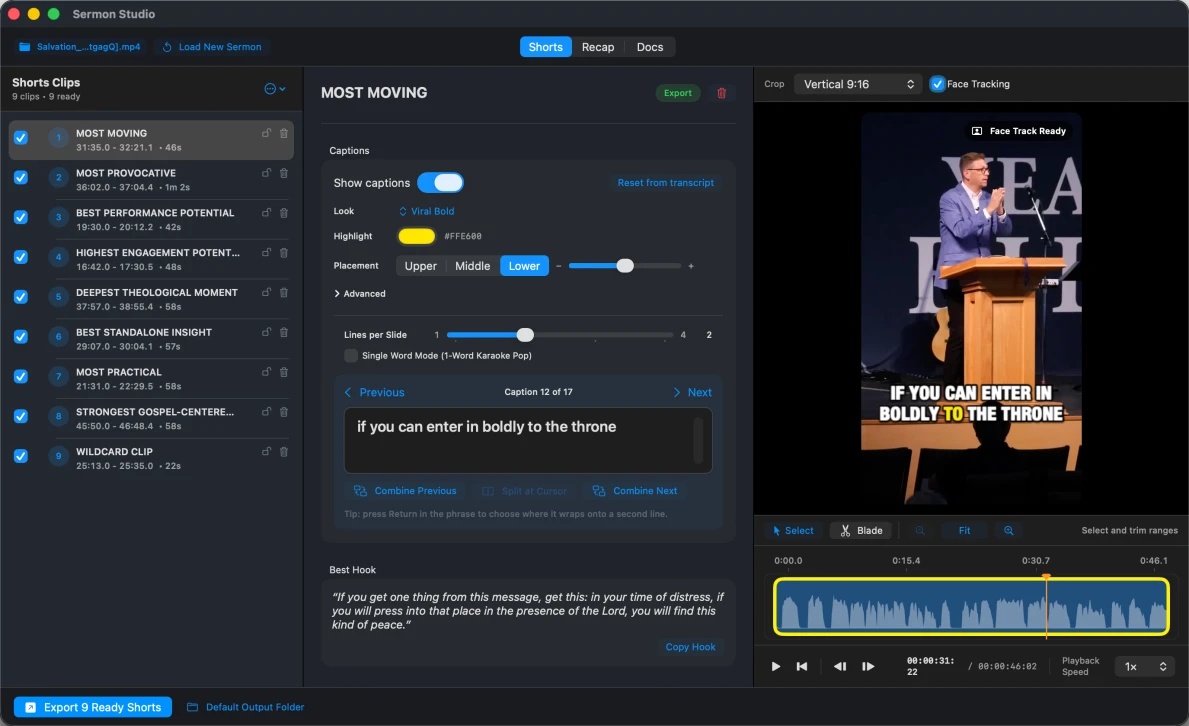
Start with the strongest moments already surfaced from the sermon. Review the vertical preview, trim on the waveform, adjust the crop, and export only the clips you approve.
Strongest moments surfaced
Sermon Studio analyzes the entire sermon and surfaces its strongest self-contained moments for review. Skip the hour of scrubbing and begin with clips already worth considering.
Captions ready with the clip
Precisely timed captions are built from the sermon transcript. Adjust the style, placement, line breaks, and emphasis—then save your own caption presets for next week.
Precise trimming without a complicated timeline
See exactly where the moment begins and ends. Tighten the clip in seconds.
Export the whole week at once
Approve the clips you want and export them together directly to your Mac. A week’s worth of sermon shorts can be ready before the coffee finishes brewing.
Everything needed. Nothing extra.
Built for the whole church week.
A focused set of tools for carrying one preached message into shorts, recaps, and useful ministry resources.
Strong-moment discovery
Surface the sermon’s strongest self-contained moments so you begin with clips already worth reviewing.
Timed caption controls
Style placement, line breaks, emphasis, and highlights—then save your own caption presets for next week.
Automatic face tracking
Keep the preacher framed inside a social-ready vertical crop without keyframing every movement.
Coherent sermon recaps
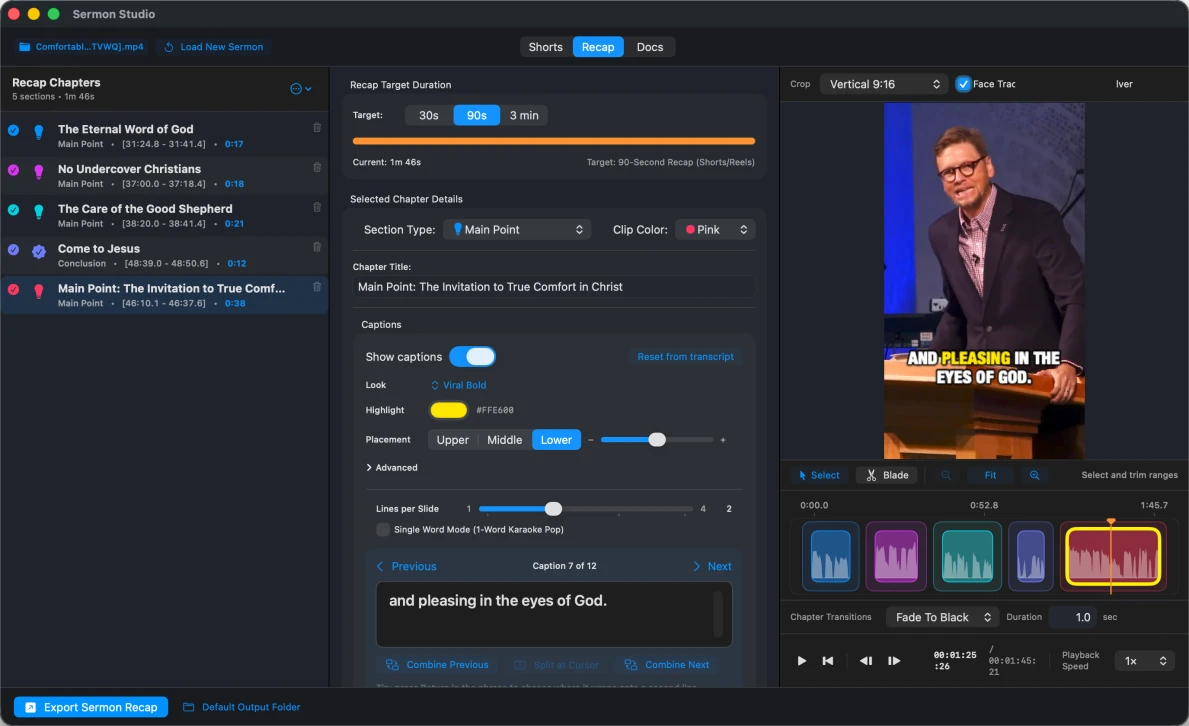
Shape sermon chapters into a 30-second trailer, 90-second recap, or fuller three-minute retelling.
Ministry documents
Prepare small-group guides, devotionals, youth and family resources, newsletters, notes, transcripts, and articles.
Focused trimming
See exactly where a moment begins and ends, then tighten the clip in seconds on the waveform.
Visual post scheduling
Drag finished videos onto your calendar, choose a posting time, and plan up to 30 days ahead in month or week view.
Local project files
Your sermon media, edits, project files, and finished exports stay on your Mac.
Publish to your channels
Choose connected YouTube, Instagram, Facebook, and TikTok accounts. Publish now, schedule a post, or save a draft for later.
Batch export
Approve the shorts you want and export the entire ready set together, directly to your Mac.
Paid beta now live
The first 100 churches save for a year.
The first 100 churches to join the Sermon Studio paid beta receive special first-year pricing. Paid-beta members get the complete workflow on two Macs and help shape Sermon Studio as it moves toward its full public release.
Monthly
$9 per month for your first 12 paid months, then $29 per month.
Annual
$99 prepaid for your first year, then $299 per year.
Trial
14 days with a payment method. No charge until the trial ends.
Support
Paid-beta support is available at support@sermonstudioapp.com.
Cancellation
Cancel anytime. Existing local sermon work remains accessible.
SERMON STUDIO · PAID BETA
First 100 Churches offer
NOW LIVE
$9/ month
or $99 prepaid for the first year
✓ Full Sermon Studio paid beta—no reduced tier
✓ Process as many sermons as you want for one monthly price
✓ One license for two Macs
✓ Native transcription, shorts, recaps, captions, and timelines
First 100 Churches paid-beta offer. Payment method required for the 14-day trial. Monthly renews at $29/month after 12 paid months; annual renews at $299/year after the first year. Offer applies to the original subscription and ends after 100 paid-beta subscriptions. Taxes may apply.
A native Mac workspace
Right at home on your Mac.
Sermon Studio keeps the entire workflow in one focused window—from surfaced moments and recap chapters to caption styling and publishing. Your sermon video stays on your Mac, and even an entry-level Apple silicon model has more than enough power to keep up.
How does the First 100 Churches paid-beta offer work?
The first 100 churches to start a paid-beta subscription can choose $9 per month for the first 12 paid months or $99 prepaid for the first year. Monthly then renews at $29/month; annual renews at $299/year.
What does paid beta mean?
You receive the complete Sermon Studio workflow while the product is still being refined ahead of its full public release. Paid-beta members can send questions and feedback to support@sermonstudioapp.com.
What happens after the 14-day trial?
Your chosen monthly or annual subscription begins automatically unless you cancel before the trial ends. A payment method is required to begin, but no charge is made until day 14. The exact first charge and later renewal price are shown before you submit checkout.
Which Macs can run Sermon Studio?
Sermon Studio is built natively for Apple silicon Macs running macOS 14 Sonoma or later. Even an entry-level Apple silicon Mac has more than enough power for creating sermon shorts. One subscription can be activated on two Macs.
Where are my sermons and project files stored?
Your source media, project files, edits, and exports stay on your Mac. Features that require hosted processing securely handle the necessary transcript text, but Dominion Media does not store sermon transcripts, instructions, generated text, or video in its service.
What happens if a renewal payment fails?
Full access continues during a seven-day courtesy period. After that, until billing is restored, you cannot load or edit any new sermons. Existing local sermons remain available to open, edit, and export.
Is there a sermon or processing limit?
Generally no. Normal usage for a busy church is expected. Sunday morning, Sunday night, Wednesday night, Sunday school lectures… go for it.
However, if there is a large usage spike beyond what could reasonably be expected from an active local church, your subscription may be paused until it can be reviewed.
Can Sermon Studio publish directly to social platforms?
Yes. The Post workspace lets you publish finished videos to connected YouTube, Instagram, Facebook, and TikTok accounts. Publish now, schedule up to 30 days ahead, or save a draft for later.
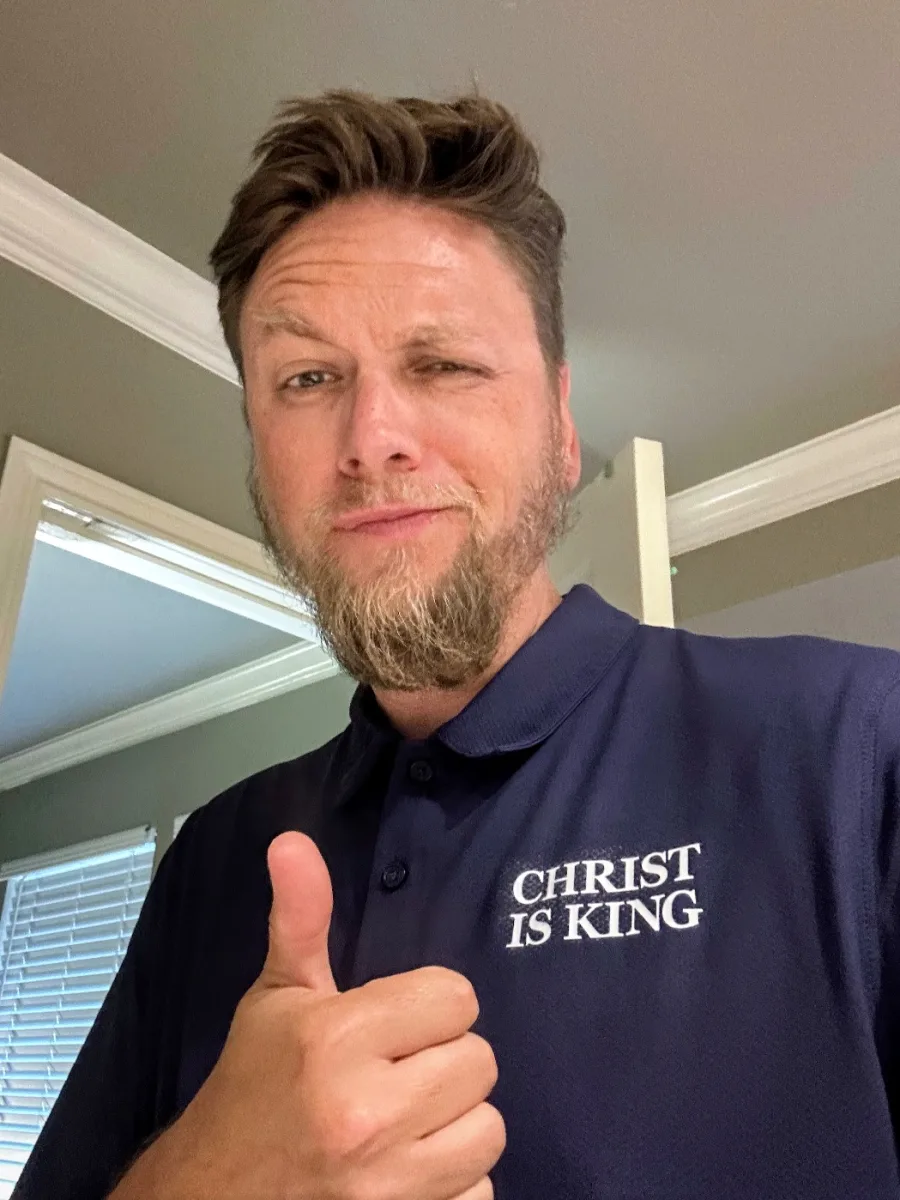
Pastor Matt BellChrist Is King ChurchSan Antonio, TX
Why I built Sermon Studio
Built by a busy pastor, for busy pastors.
Your sermon is too good to die on Monday.
We all know the Word of God is powerful. Your congregation needs to be reminded throughout the week of how God spoke to them through his Word.
But God did not call you to edit videos. He called you to feed his sheep.
I was unsatisfied with the tools and workflows available—and with how much time I was wasting fighting software that was never designed for this job. So I started building the tool I needed: a faster, simpler way to turn Sunday's sermon into a week's worth of content to feed our congregation.
It really helped me, so I thought maybe it could help you too.
The paid beta is live. Let the lion out.
Start with a 14-day free trial. The first 100 churches to join the paid beta receive $9 monthly or $99 annual first-year pricing.